
Introduction
In today’s digital business world, companies rely heavily on software to manage daily operations. Two of the most widely used systems are CRM (Customer Relationship Management) and ERP (Enterprise Resource Planning).
At first glance, CRM and ERP may seem similar — both aim to improve efficiency, streamline processes, and drive growth. However, their focus areas, features, and business impact differ significantly.
In this article, we’ll break down the key differences between CRM and ERP, explore their individual benefits, and help you decide which system (or both) is right for your business.
Key Takeaways
- CRM = Customer Relationship Management (sales, marketing, support).
- ERP = Enterprise Resource Planning (finance, HR, supply chain).
- CRM boosts revenue growth, ERP boosts operational efficiency.
- Small businesses → Start with CRM.
- Large enterprises → Invest in ERP, integrate with CRM.
- Future = AI, cloud, and unified CRM+ERP systems.
What is CRM?
CRM stands for Customer Relationship Management. It focuses on managing customer interactions, tracking sales, and improving marketing and support services.
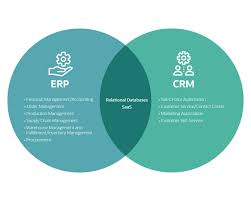
Core Functions of CRM:
- Sales pipeline management
- Contact and lead tracking
- Marketing automation
- Customer support & service
- Customer data analytics
Example CRM tools: Salesforce, HubSpot, Zoho CRM, Pipedrive
What is ERP?
ERP stands for Enterprise Resource Planning. It focuses on managing core business operations like finance, supply chain, HR, and inventory.
Core Functions of ERP:
- Accounting and financial management
- Inventory and supply chain management
- Human resources and payroll
- Procurement and vendor management
- Production planning and scheduling
Example ERP tools: SAP, Oracle NetSuite, Microsoft Dynamics 365, Odoo
CRM vs. ERP: Key Differences
| Feature | CRM | ERP |
|---|---|---|
| Focus | Customers & sales growth | Operations & efficiency |
| Main Users | Sales, marketing, support teams | Finance, HR, supply chain, operations |
| Goal | Improve customer experience & revenue | Streamline processes & reduce costs |
| Data Managed | Leads, contacts, customer behavior | Finances, inventory, employee data |
| Examples | Salesforce, Zoho, HubSpot | SAP, Oracle, Dynamics 365 |
Benefits of CRM
- Better Customer Relationships – Helps build trust and loyalty.
- Increased Sales – Sales pipeline tracking improves conversions.
- Data-Driven Marketing – Target campaigns based on customer behavior.
- Improved Customer Service – Quick access to customer history.
- Collaboration Across Teams – Sales, marketing, and support share the same data.
Benefits of ERP
- Efficiency in Operations – Automates finance, HR, supply chain.
- Cost Reduction – Minimizes manual errors and waste.
- Centralized Data – Provides a single source of truth for all business processes.
- Compliance & Reporting – Helps with audits and regulations.
- Scalability – Grows with your business needs.
CRM and ERP Together: A Powerful Combination
Many businesses use both CRM and ERP, integrating them to create a complete ecosystem.
- CRM drives revenue and growth.
- ERP ensures cost efficiency and smooth operations.
- Integration gives businesses a full end-to-end visibility of customers, finances, and operations.
Example: Microsoft Dynamics 365 offers both CRM and ERP modules, working together seamlessly.
When Should a Business Use CRM?
- Startups and SMEs focusing on sales growth.
- Companies with large customer bases needing personalized marketing.
- Businesses aiming to improve customer retention.
When Should a Business Use ERP?
- Manufacturing firms needing inventory and production planning.
- Enterprises with complex supply chains.
- Businesses needing robust financial management.
- Organizations struggling with data silos across HR, finance, and operations.
CRM vs. ERP Costs
- CRM Pricing: Free (HubSpot) to $25–$300/user/month.
- ERP Pricing: Can start at $100/user/month and scale to millions for large enterprises.
Case Studies
Case Study 1: CRM Success – HubSpot
A small e-commerce business used HubSpot CRM to improve lead nurturing. Result: 35% higher conversion rate.
Case Study 2: ERP Success – SAP
A manufacturing company implemented SAP ERP to manage its supply chain. Result: 20% cost reduction and improved delivery times.
Case Study 3: CRM + ERP Integration
A mid-sized retail chain integrated Salesforce CRM with Oracle NetSuite ERP. Result: better customer insights and optimized inventory management.
Common Challenges
With CRM
- Low adoption by sales teams.
- Poor data quality.
- Over-automation without personalization.
With ERP
- High implementation costs.
- Complexity in customization.
- Long training periods for employees.
CRM vs. ERP Trends in 2025
- AI-Powered CRM – Predictive analytics for customer behavior.
- Cloud ERP – Faster and more scalable solutions.
- Mobile Accessibility – Access CRM/ERP from anywhere.
- IoT Integration – ERP connected with devices in supply chains.
- Unified Platforms – More companies adopting systems that combine CRM + ERP.
FAQs
Q1. Which is more important: CRM or ERP?
Both are important, but CRM is often the first step for growing companies.
Q2. Can CRM and ERP be integrated?
Yes, many platforms offer integration options for full visibility.
Q3. Is ERP only for large companies?
No. Cloud-based ERP (like Odoo) is affordable for SMEs too.
Q4. What is the main difference between CRM and ERP?
CRM focuses on customers and sales, ERP focuses on operations and efficiency.
Q5. Which industries use CRM the most?
Retail, real estate, finance, healthcare.
Q6. Which industries use ERP the most?
Manufacturing, logistics, construction, finance.
Q7. Can a business start with CRM and later adopt ERP?
Yes, many small businesses begin with CRM before scaling into ERP.
Conclusion
CRM and ERP serve different but complementary roles. CRM helps businesses grow revenue by improving customer relationships, while ERP helps reduce costs and optimize operations.
The right choice depends on your business size, industry, and goals — but for maximum efficiency, many companies eventually integrate both systems.